
Footswitches and the pedal view
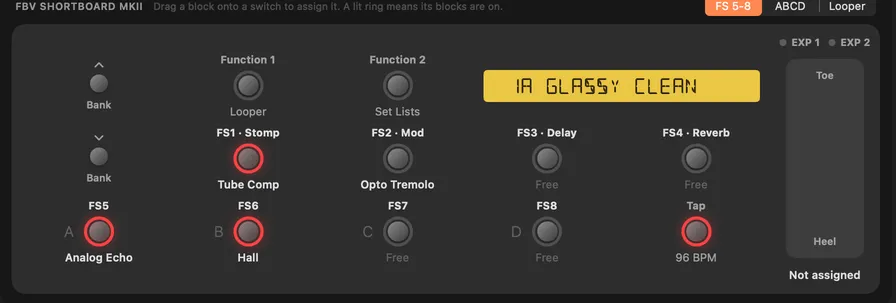
The strip under the chain looks like your controller:
- On the HD500 and HD500X it shows the pedal's own footswitches.
- On the HD Desktop, HD Pro and HD Pro X it shows the FBV controller you pick in Settings › General. That can be a Shortboard MkII, an FBV 3 or an Express MkII.
The display shows the slot and preset name the way the controller's own display does.
- Drag a block onto a switch to assign it, or onto the treadle for the toe switch. One switch can control several blocks, and then shows "Multi".
- Right-click a switch to remove an assignment.
- Click a switch to turn its blocks on or off, like stepping on it.
- A red ring means the switch's blocks are on.
The control at the top right picks what the bottom row shows:
| View | Bottom row |
|---|---|
| FS 5-8 | Block switches |
| ABCD | Presets A to D of the bank (click one to load it) |
| Looper | The looper functions |
KidneyHD can't read the pedal's FS Mode, so set this to match the pedal yourself.
The FBV Express MkII has only A to D (FS5 to FS8) and the toe switch, so with it chosen the footswitch menus leave out FS1 to FS4. Set FBV Express to On on the pedal's Setup page 2.
The EXP 1 and EXP 2 lights show a count when more than one setting follows that pedal. Adding a Wah or Volume model assigns it to EXP 1 or EXP 2 on top of what's already there.